AI MVP Development: How to Build an MVP With AI (and What to Keep Human)

AI coding tools can get an MVP in front of users fast. Here's how to build an MVP with AI: what to let AI build, what to keep human, and how to launch without inheriting a fragile codebase.

AI coding tools have changed what a minimum viable product costs. A small team, sometimes one person, can now get a working first version in front of users in a fraction of the time it used to take.

But fast isn't the same as finished. Many AI-built MVPs work in a demo and fall over in production: security holes, data that can't be migrated, and code nobody fully understands.

This guide explains how to build an MVP with AI: what to let AI build, what to keep human, what it costs, and a realistic path from idea to launch.

What Is AI MVP Development?

AI MVP development means building the first version of a product with AI coding tools, such as AI assistants in your editor or agents that write and change code from instructions, doing much of the hands-on typing. People still decide what to build, how it fits together, and what is safe to release.

Done well, it shortens the path to real user feedback. Done badly, it produces a prototype that has to be thrown away the moment it gets customers.

Vibe Coding vs. AI-Assisted Development

Vibe coding means describing what you want and accepting whatever code the AI produces, often without reading it. It's great for throwaway prototypes and weekend projects.

AI-assisted development uses the same tools, but an experienced engineer designs the system, reviews the output, and decides what ships. For an MVP that will hold real customers, data or payments, that's the approach you want. More on this in vibe coding in production.

What AI Does Well When You Build an MVP

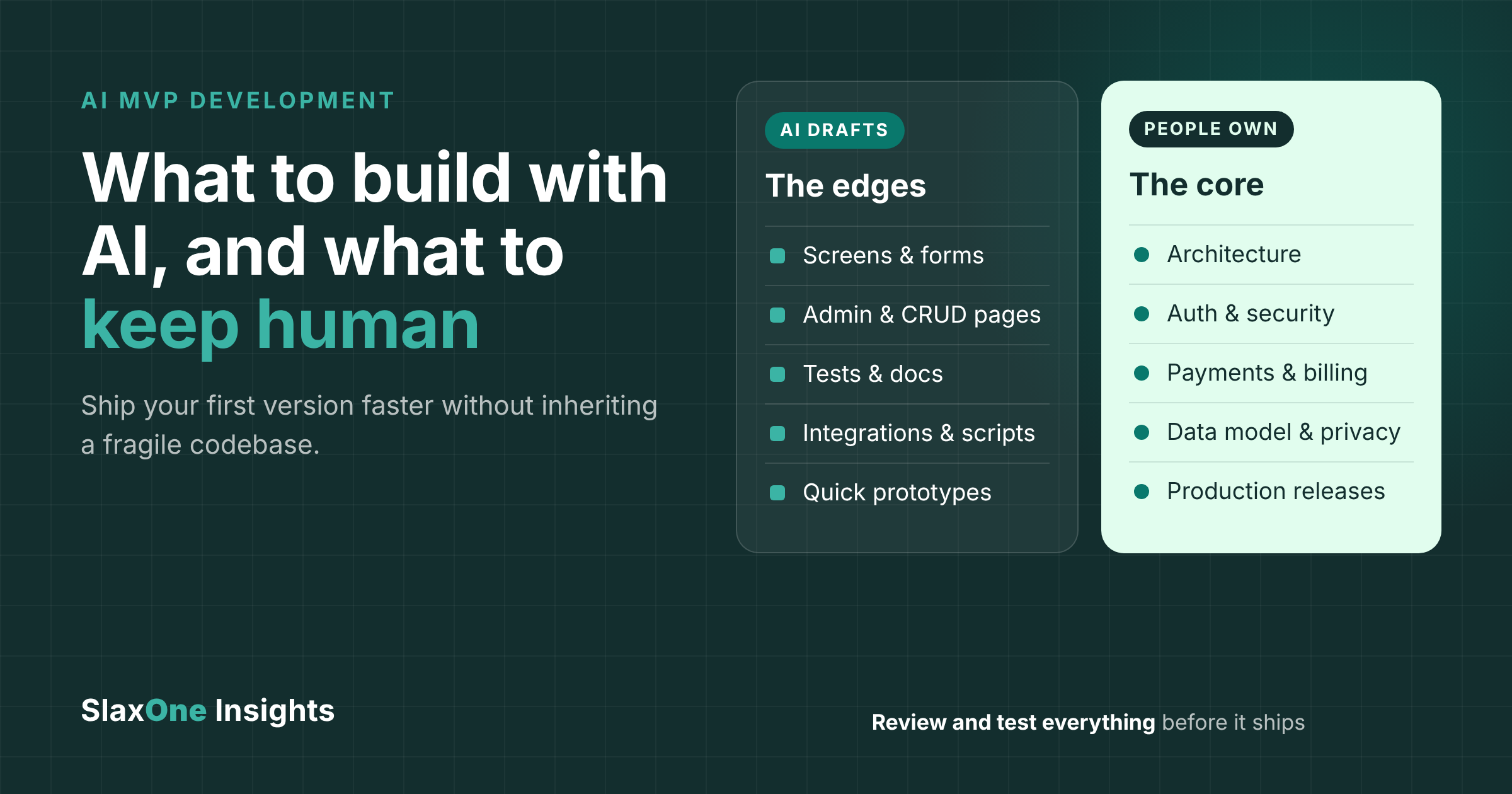
AI tools are strongest where the work is well-defined and mistakes are cheap to catch:

  • Screens and forms: layouts, validation and standard UI patterns.
  • Admin and CRUD pages: the create/read/update/delete screens every product needs.
  • Tests and documentation: first drafts of unit tests, API docs and READMEs.
  • Integrations and scripts: glue code for common APIs, data imports and one-off scripts.
  • Quick prototypes: throwaway versions to test an idea with users before committing.

These are the edges of a system. Little else depends on them, so if one is wrong you can fix or rewrite it without breaking everything else.

What to Keep Human

Some decisions are expensive to change later. They need an experienced engineer, even if AI drafts the code:

  • Architecture: how the system is split up, where data lives, and how it will scale.
  • Authentication and security: logins, permissions, secrets and access to customer data.
  • Payments and billing: anything that moves money or affects invoices.
  • Data model and privacy: how records relate, what you store, and how you'll handle compliance.
  • Production releases: what ships, when, and how you roll back if something breaks.

A simple rule: let AI write the leaves, and keep people in charge of the trunk. Tech debt matters least where nothing else depends on the code.

How to Build an MVP With AI: A 7-Step Process

  1. Define the one problem and the one user. An MVP that tries to do everything takes as long as a full product, AI or not.
  2. Write a short spec. Core user journeys, what's out of scope, and the success measure. Good instructions are the biggest factor in good AI output.
  3. Design the core yourself. Data model, authentication approach, hosting, and separate dev, staging and production environments.
  4. Let AI build the edges, in small slices. One feature at a time, each reviewed and tested before the next.
  5. Review, test and secure. Code review on every change, automated tests on the critical paths, and a security pass before real users arrive.
  6. Deploy properly. Use a cloud setup you can grow into, for example on AWS with infrastructure as code, CI/CD, backups and monitoring, so launch day isn't the day you discover you have no logs.
  7. Ship to real users, measure, iterate. The point of an MVP is learning. Plan the next slice from what users actually do.

Building an AI-Powered MVP

Sometimes the product itself uses AI: a chatbot, a document assistant, or automated workflows. The same rules apply, plus a few more: decide which AI model provider you'll use, keep customer data out of prompts unless you're allowed to send it, log and review what the AI produces, and set usage limits so a spike doesn't become a surprise bill. If you're adding AI to an existing product, see AI automation.

How Much Does It Cost to Build an MVP With AI?

It depends on scope, not on the tools. The main cost drivers are:

  • The number of user journeys and screens
  • Integrations with other systems (payments, CRMs, identity providers)
  • Security and compliance needs, such as handling health or financial data
  • Cloud hosting, monitoring and AI model usage once you have real users
  • How much of the core needs careful, senior design

AI tools mostly shrink the cost of the edges. They don't remove the cost of design, security and review, and skipping those is what makes cheap MVPs expensive later.

Common Mistakes With AI-Built MVPs

  • Shipping code nobody understands. If no one can explain how login or payments work, you can't fix them at 2 a.m.
  • Secrets in the code. API keys and passwords pasted into source files or front-end code.
  • No tests on the critical paths. Sign-up, checkout and data export break quietly.
  • A demo database in production. No backups, no migrations, no separation between test and real data.
  • Surprise cloud bills. Oversized resources and missing budgets. See how to reduce your AWS bill.
  • Treating the MVP as throwaway, then keeping it for years. Decide up front which parts are temporary.

Is AI-Generated Code Production-Ready?

It can be, if it goes through the same discipline as any other code: review, tests, security checks and monitoring. Where the code came from matters less than whether someone accountable has verified it.

AI MVP Checklist

  • One problem, one user, one success measure
  • A written spec and an out-of-scope list
  • Data model, auth and hosting designed by an experienced engineer
  • Features built in small, reviewed slices
  • Tests on sign-up, payments and data handling
  • No secrets in code; least-privilege access
  • Separate dev, staging and production
  • Backups, monitoring and a budget alert from day one
  • A plan for what to rebuild after you learn from users

FAQs

How long does it take to build an MVP with AI?

It depends on scope, integrations and how much of the core needs careful design. AI shortens the build. It doesn't remove the need to decide what to build and make it safe.

Can I build an MVP with AI without a technical co-founder?

For a prototype to test an idea, often yes. For a product that handles real customers, payments or personal data, bring in an experienced engineer to own the architecture, security and releases, even part-time.

Will I have to rebuild an AI-built MVP later?

Not if the core is designed properly from the start. The edges can be rewritten cheaply; a badly designed core is what forces a rebuild.

Who owns the code?

You should. Make sure the code lives in your own repository and runs in your own cloud account.

Build Your MVP With SlaxOne

SlaxOne's AI-assisted product development pairs AI coding tools with senior engineering: we design the core, let AI speed up the edges, and review, test and deploy everything on AWS. Need AI inside an existing product instead? See AI automation.

Book a free product consultation →